


🌐 Read this in your language: 日本語 · Español · Français · Português (BR) · Tiếng Việt · 한국어
If you highlight on the web every day, you have probably felt the small frictions: a highlight that will not stick on a stubborn page, a sidebar that takes a moment too long, an interface that only speaks English.
Glasp Extension v2.0.0 is our answer to all three. It is the biggest rewrite since we launched, and it is rolling out now.
What is new
A new highlighting engine. Faster and more reliable highlighting, everywhere.
A redesigned sidebar. Cleaner, quicker, and easier to live in.
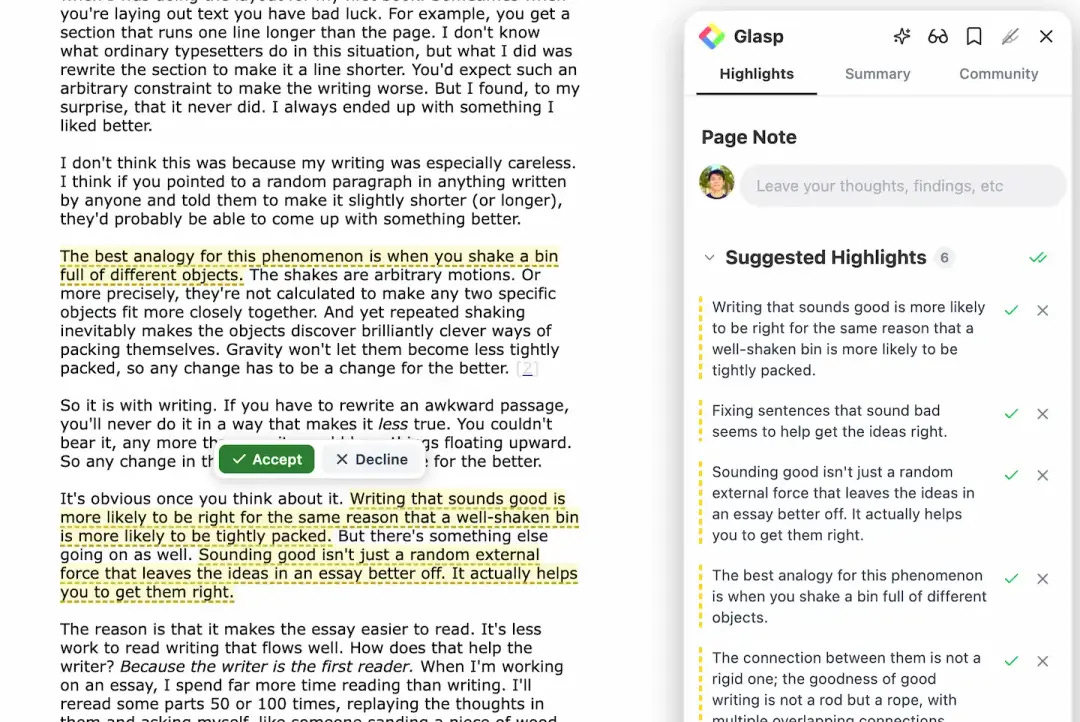
Suggested Highlights. AI picks the key sentences, you accept with one click.
AI Overview. Get the shape of a page before you read it.
A better Community experience. Discover what others highlighted on the same page.
7 languages, Dark and Light themes. Make the sidebar yours.
Two quick notes before you dive in.
1. Do you already have v2? Look at the extension. If the UI looks new, you are on v2. Another sure sign: if the update page opened by itself for you recently, that only happens after the extension updates, so you are already on it.
2. You will be signed out once. The upgrade signs you out of the extension a single time. Nothing is lost. Just click Sign in inside the extension and you are back, with every highlight where you left it.
1. Highlighting that just works
The engine underneath the extension has been rebuilt. Pages that used to fight back, long articles, heavy web apps, oddly structured layouts, now behave. Highlights land where you put them and save faster.
Nothing changes in how you use it. Select text, highlight, done. It simply stops getting in your way.
2. Suggested Highlights: let AI do the first pass
Open the sidebar on any article and Glasp will suggest the sentences worth keeping. Skim them, click the ones you agree with, and they become your highlights.
This is not a summary that replaces your reading. It is a first pass that respects it. You stay the editor, and the AI just does the pointing.
3. AI Overview before you commit
Not every article deserves twenty minutes. AI Overview gives you the shape of a page up front, so you can decide whether to read closely, skim, or move on. It pairs naturally with Suggested Highlights: get the overview, then keep the lines that matter.
4. See what others highlighted
The Community experience in the sidebar has been improved. On many pages you can now see what other readers marked as important, which is often the fastest way to find the part of an article people actually remember.
This has always been the idea behind Glasp: learning is better when it is not done alone.
5. Your language, your theme
Glasp now speaks English, Español, Français, Português (BR), Tiếng Việt, 日本語, and 한국어. There are two separate settings for it, and you will find both in Preferences:
Interface Language. The language of Glasp itself, menus, buttons, the sidebar.
Summary Language. The language your AI summaries come back in.
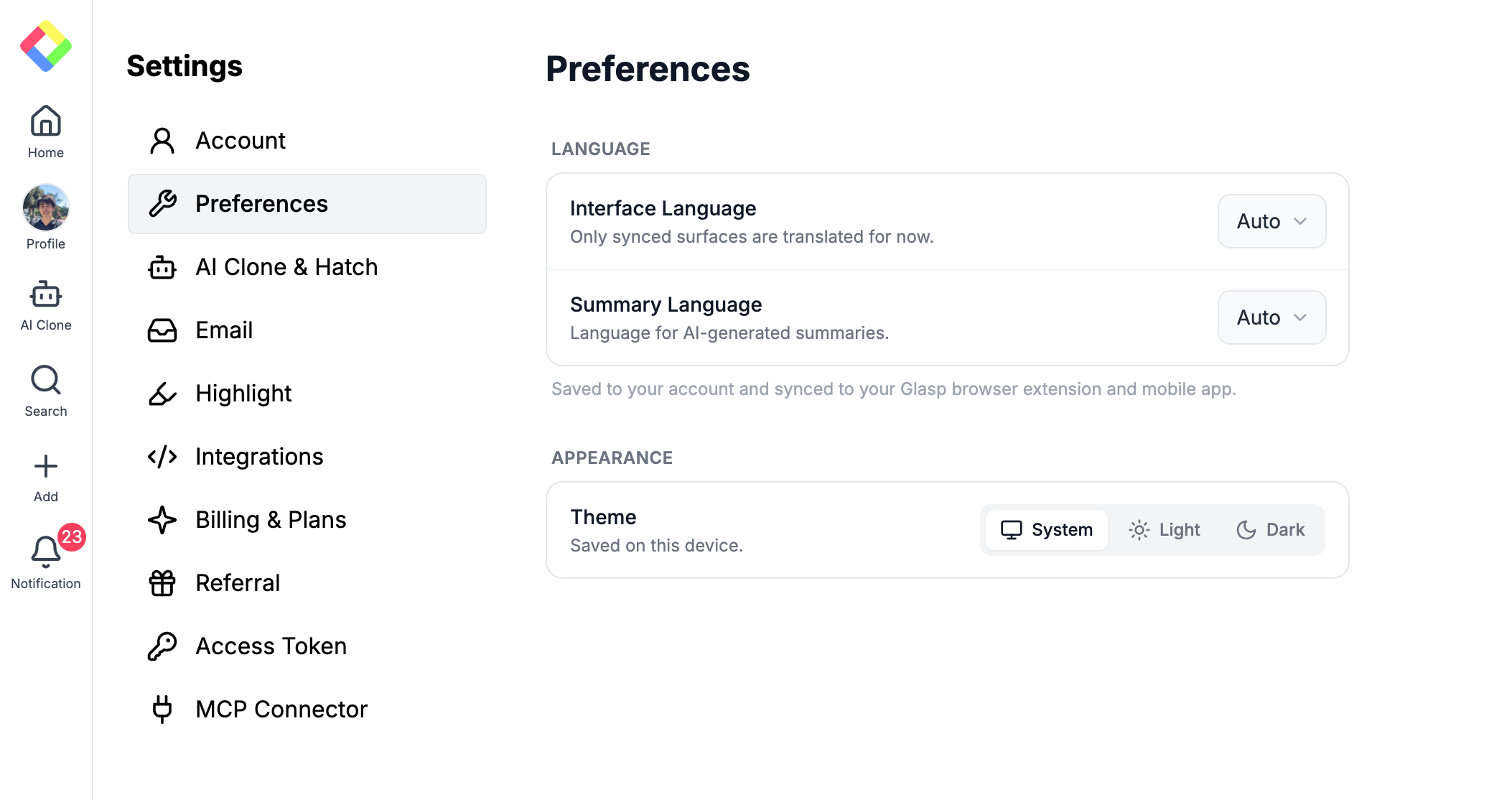
They are separate on purpose. Plenty of people want the interface in their own language while still reading source material in English, or the exact opposite: an English interface with summaries in their mother tongue. Now you can have either.
Both are saved to your account and synced to the browser extension and the mobile app, so you set them once. Summarize an English article and the summary comes back in your language, without asking for it every time.
Both default to Auto, which follows your system, so if you have never touched these settings you may already be seeing Glasp in your language. If you want to pin one, pick it from the list instead of Auto.
One honest note: only synced surfaces are translated for now, so you may still meet English in a few corners. We are working through them.
Theme lives right below, with System, Light, and Dark. Unlike language, theme is saved per device, so you can run Light on the laptop and Dark on the desktop.
How to make sure you are on v2
Browsers roll out extension updates on their own schedule, so most of you will get v2 within a day or two without doing anything.
How to tell you already have it: open the extension and look at it. The redesigned sidebar is unmistakable. And if the release notes page opened by itself in a tab recently, that only happens right after the extension updates, so that is proof too.
Curious what else has shipped? The full version history is at glasp.co/extension-update. It is a changelog to read, not a button that updates anything.
If you want v2 right now: go to the Glasp page on the Chrome Web Store, uninstall, then install again. That is the one method that updates you for certain. Your highlights live in your account, not in the extension, so nothing is lost.
Pro tips
Try Suggested Highlights on a long read first. That is where the time saved is most obvious.
Pick your theme before you forget. Sidebar settings, Dark or Light, takes five seconds.
Signed out after the update? That is expected, and it happens only once. Click Sign in inside the extension.
Kindle readers: auto-sync arrived in v1.3.0. Extension Settings, then Kindle Integration, and your Kindle highlights sync on their own.
v2 took a long time to build, and it exists because of what people told us was annoying. If something feels off, or something feels great, reply to this email. We read every reply.
Happy highlighting,
The Glasp Team
–
Partner With Glasp
We currently offer newsletter sponsorships. If you have a product, event, or service you’d like to share with our community of learning enthusiasts, sponsor an edition of our newsletter to reach engaged readers.
Glasp Extension v2 is a whole new experience!
It helps my learning process a lot :)
The Highlight Suggest feature is dope!
v2 was a full rewrite of the highlighting engine, so if you hit a page that used to fight back, try it again and let me know how it goes.
Two quick answers to the questions we get most: if the sidebar looks new, you already have v2. And if you want it immediately, uninstall and reinstall from the Chrome Web Store, that is the one way to force the update. Your highlights are in your account, so nothing is lost.
Which feature are you most curious about, Suggested Highlights or AI Overview? I'll go first: Suggested Highlights on long research papers has saved me the most time.
No Substack account? We're also on Reddit: https://www.reddit.com/r/glasp/